

MerryDiv Review 2026: The Dividend Tracker That Syncs With Your Real Brokerage Accounts
By Benjie • Published November 11, 2026 • TopDividendTools.com
30% off your first 2 months on a monthly plan, or 30% off your first year on an annual plan. Redeem it at checkout on merrydiv.com (not through Apple in-app purchases).
MerryDiv is a dividend tracker built for income investors that connects to your real brokerage accounts through Plaid (read-only) and pulls in every dividend you're paid automatically. It has a free manual plan, paid sync plans from $5.99 a month, a 14-day free trial, a web app and an iOS app. After using it, it has become one of the dividend trackers I'd recommend first.
I've been a dividend investor for over ten years and I've tested a lot of trackers for this site. Most of them make you do the boring part yourself, and most of them get your actual income wrong. MerryDiv fixes both of those, and it looks great doing it. Here's what I like, what it costs, and who it's for.
The Quick Verdict
| What I looked at | MerryDiv |
|---|---|
| Brokerage sync | Yes, via Plaid (read-only), 10,000+ US & Canadian institutions |
| Dividend data accuracy | Payouts come straight from your brokerage, so they match your account |
| Free plan | Yes: unlimited manual accounts, holdings and transactions |
| Paid plans | $5.99, $9.99 or $19.99 a month (yearly billing gets 2 months free) |
| Free trial | 14 days |
| Apps | Web + iOS (synced), plus a free Chrome extension |
| Best for | Dividend investors with accounts at more than one brokerage |
What I Personally Love About MerryDiv
1. It works with your actual brokerage accounts, safely
This is the big one for me. I don't want to type in every buy, every DRIP and every dividend by hand. With MerryDiv you connect your brokerages through Plaid, the same connection service a lot of banking and budgeting apps use, and your holdings and dividend payments sync in on their own.
The connection is read-only. MerryDiv can see your positions and payouts, but it can't trade, move money or change anything in your account, and your brokerage login goes through Plaid instead of being stored on MerryDiv's servers. That's exactly how I want a tracker to work. It covers Schwab, Fidelity, Vanguard, Robinhood, E*TRADE, Merrill Edge and thousands more, and you can mix a Roth IRA, 401(k), taxable account and HSA into one dividend feed.
2. Simple to follow, but it looks premium
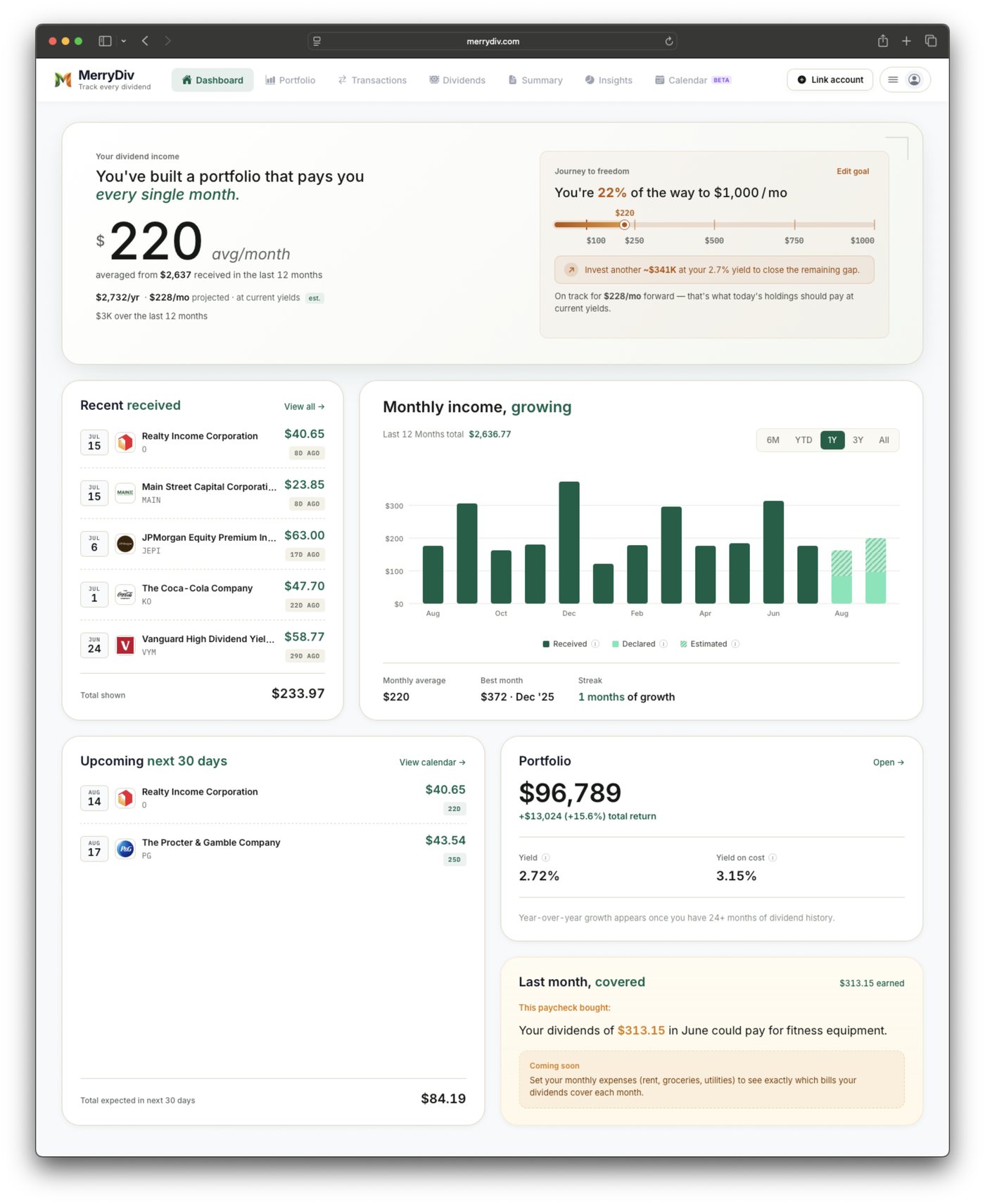
A lot of trackers either look like a spreadsheet from 2009 or bury your income under ten charts you'll never use. MerryDiv gets the balance right. You open it and the first thing you see is what you actually care about: your average monthly dividend income, what you've received lately, and what's coming next.
It's clean and easy enough for a brand new investor, but the design is polished. Little touches like the "journey to freedom" progress bar toward your monthly income goal and the "this paycheck bought" card make it feel like a tool someone cared about building. I found myself opening it just to look at it.
3. The dividend data is accurate
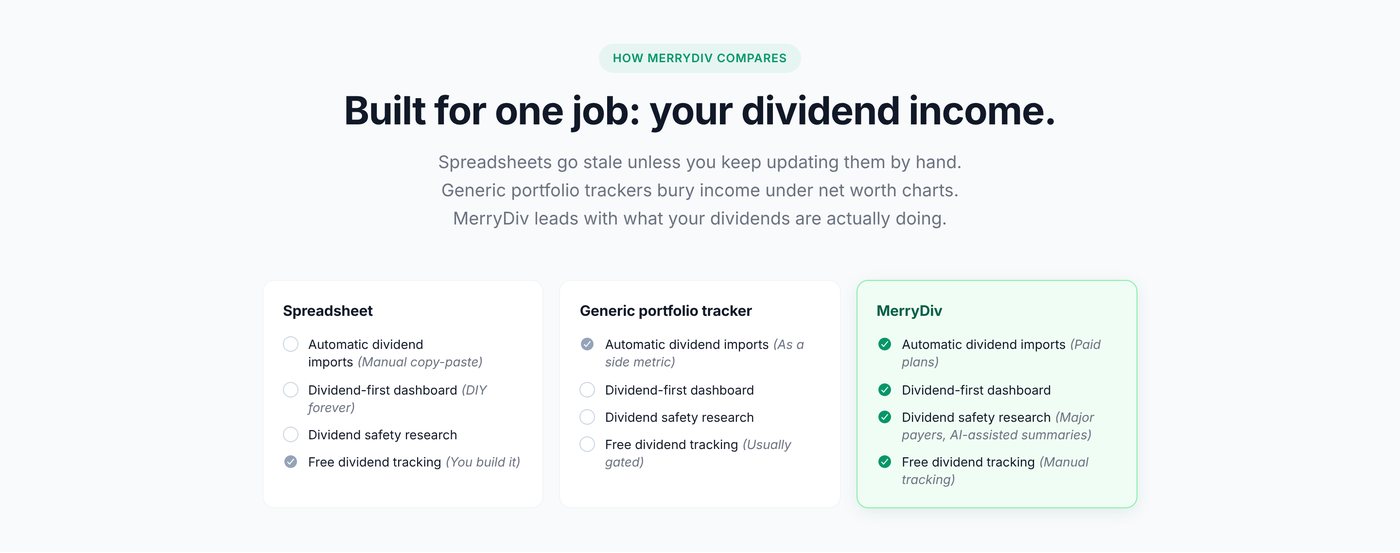
Here's something most people don't realize until they've used a few trackers: a lot of dividend trackers show you the wrong numbers. They estimate your income from a generic dividend database, so special dividends get missed, DRIP shares get counted wrong, ETF distributions that change every month get guessed at, and your "income" ends up off from what your broker actually paid you.
MerryDiv takes a different approach. According to MerryDiv, your dividend payments and history come directly from your brokerage via Plaid, so they match what actually hit your account. For yields, stocks use the indicated forward yield and funds use trailing 12-month cash distributions, which is the right way to look at monthly-paying income ETFs. When I'm tracking real income, real numbers are the whole point.
Why this matters for ETF investors: If you hold monthly payers like $JEPI, $JEPQ or $SPYI, the distribution changes almost every month. A tracker that projects from an old number will be wrong. A tracker that records what your broker actually paid won't be.
Connect your brokerage with MerryDiv →
Use code DEVOTED30 for 30% off.
MerryDiv's Main Features
Automatic dividend tracking
Link your accounts once and every dividend shows up on its own: received, declared and estimated. You can view your income by month, quarter or year and see if your income is growing.
Dividend calendar
A 12-month forward dividend calendar shows what's coming and when, so you can plan around your payouts instead of guessing. The dashboard also shows a running "next 30 days" total.
Portfolio X-Ray
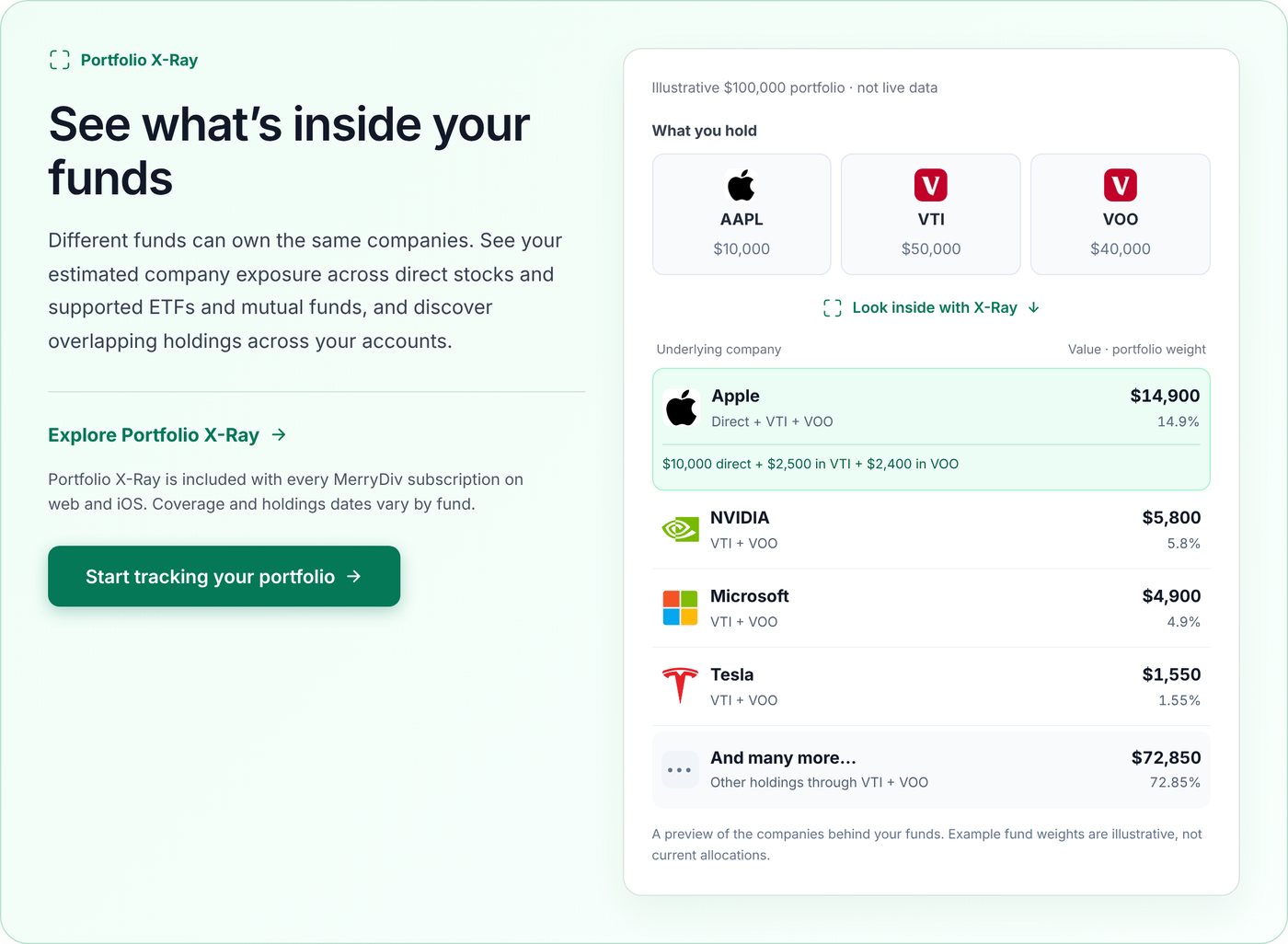
This is my favorite feature after the brokerage sync. If you own a stock directly and also own ETFs that hold it, you probably own more of it than you think. X-Ray looks inside your ETFs and mutual funds and shows your real exposure to each company across all of your accounts.
Portfolio Insights
Breakdowns by sector, asset type and country, so you can spot when your income leans too hard on one area.
Free research and calculators
Even on the free plan you get DRIP, growth and income calculators, stock pages with AI dividend summaries and dividend safety analysis, plus free lists like the Dividend Aristocrats and Dividend Kings. There's also a free MerryDiv Dividend Toolkit Chrome extension that doesn't need an account.
Web and iOS, in sync
Check your income on your laptop or your phone. The iOS app and the web app stay in sync. You can also export to CSV whenever you want your data.
MerryDiv Pricing (2026)
| Plan | Price | Synced brokerages | What you get |
|---|---|---|---|
| Free | $0 | Manual only | Unlimited manual accounts, holdings and transactions, calculators, stock pages, 6-month dividend chart, X-Ray preview (up to 3 companies) |
| Starter | $5.99/mo | 2 | Automatic sync, full dividend history, Portfolio X-Ray, 12-month dividend calendar, Portfolio Insights, CSV export |
| Expert (most popular) | $9.99/mo | 5 | |
| Ultimate | $19.99/mo | 10 |
Yearly billing gets you 2 months free, every paid plan has a 14-day free trial, and you can cancel anytime. On top of that, my code DEVOTED30 takes 30% off your first 2 months on monthly, or 30% off your whole first year on annual. Make sure you subscribe on merrydiv.com to use the code, since it doesn't work through Apple in-app purchases.
Who MerryDiv Is For
- Dividend investors with more than one account. If you have a Roth at one broker and a taxable account at another, this is where MerryDiv shines.
- Income ETF investors who want what their funds actually paid, not a stale estimate.
- Anyone tired of updating a spreadsheet every time a dividend hits.
- Investors working toward a monthly income goal who want to see their progress.
Pros and Cons
Pros
- Secure, read-only brokerage sync through Plaid
- Dividend data comes straight from your broker
- Clean, polished, easy to follow design
- Portfolio X-Ray shows overlap inside your ETFs
- Generous free plan for manual tracking
- Web and iOS apps that stay in sync
Cons
- Automatic sync needs a paid plan
- Brokerage sync covers US and Canadian institutions only
- No Android app yet
My Take
If you want a dividend tracker that does the work for you, gives you numbers you can trust, and is actually enjoyable to open, MerryDiv is the one I'd try first. The Plaid brokerage sync and the accuracy are what sold me, and the design is the bonus. Start on the free plan or the 14-day trial, link one account, and see your real dividend income in a couple of minutes.
Try MerryDiv for Free
Link your brokerage through Plaid and see every dividend you've been paid, in one place.
- 14-day free trial on every paid plan
- Free plan for manual tracking
- Code DEVOTED30: 30% off your first 2 months or first year
Get Started With MerryDiv →
FAQ: MerryDiv Review
Is MerryDiv safe to connect to my brokerage?
MerryDiv connects to brokerages through Plaid with read-only access. It can see your holdings and dividend payments, but it can't place trades or move money, and your brokerage login goes through Plaid instead of being stored on MerryDiv's servers.
Is MerryDiv free?
Yes. The free plan includes unlimited manual accounts, holdings and transactions, calculators, stock pages and a preview of Portfolio X-Ray. Automatic brokerage sync starts with the Starter plan at $5.99 a month, and every paid plan has a 14-day free trial.
How accurate is MerryDiv's dividend data?
For synced accounts, MerryDiv says dividend payments and history come directly from your brokerage via Plaid, so they match what hit your account. Stock yields use indicated forward yield and fund yields use trailing 12-month cash distributions.
Which brokerages does MerryDiv support?
Through Plaid, MerryDiv connects to 10,000+ US and Canadian institutions, including Schwab, Fidelity, Vanguard, Robinhood, E*TRADE and Merrill Edge. You can also add any stock worldwide manually.
Is there a MerryDiv promo code?
Yes. Code DEVOTED30 gives 30% off your first 2 months on a monthly plan or 30% off your first year on an annual plan. Redeem it on merrydiv.com, not through Apple in-app purchases.
Does MerryDiv have a mobile app?
Yes. MerryDiv has an iOS app that syncs with the web app. There's no Android app at the moment, but the web app works in any mobile browser.
Explore All Dividend Tools & Calculators →
Sponsored disclosure: This post is sponsored by MerryDiv, and TopDividendTools.com was paid to publish it. Links to MerryDiv are sponsored links. Screenshots are example and illustrative portfolios provided by MerryDiv. Features, prices and the DEVOTED30 offer are as of November 11, 2026 and can change at any time. This article is for educational purposes only and is not financial or tax advice. Do your own research before buying any investment or subscribing to any tool.